Bookmark Plus: A Self-Hosted Library for Bookmarks and Local Search
Import a Firefox bookmark library, organize it privately, and connect local search or an agent when needed.
A bookmark export is portable, but it becomes harder to use when years of links are buried in old folders. Bookmark Plus is one of my projects: a single-owner service for importing that library, editing saved records, and searching it without sending every saved page to a hosted bookmark service.
The repository combines a Rust application, SQLite storage, a browser interface, and optional local-model search. It can also expose saved records to another app through REST or a read-only MCP endpoint. The practical distinction is that a bookmark record is the saved URL and its metadata, not an archived copy of the page.
Start the service
The Docker path requires Git, Docker Engine with Compose, and Python 3 for the configuration helper. A Rust or Node installation and a GPU are not required on the app host. The build uses the source repository; there is no prebuilt public image described in the deployment guide.
1
2
3
4
5
git clone https://github.com/bigsk1/bookmark-plus.git
cd bookmark-plus
./scripts/setup.sh
# Review .env locally; it contains the generated admin password.
docker compose up -d --build
Open https://localhost:8443 and sign in with the username and password in .env. The initial username is admin; the helper generates a password without printing it. Keep .env private.
Caddy creates a private certificate authority for the configured hostname. A browser warning is expected until the CA is trusted. Follow the certificate instructions, distributing only the public root certificate to clients that need access. For LAN use, configure APP_DOMAIN, APP_ORIGIN, and HTTPS_PORT and point the hostname at the app host. The origin must exactly match the URL, including port. The default published port accepts connections on the host’s interfaces, so apply your firewall or VPN policy and keep the internal app port private.
Bring in a Firefox library
The repository screenshot shows the library interface with synthetic sample bookmarks.
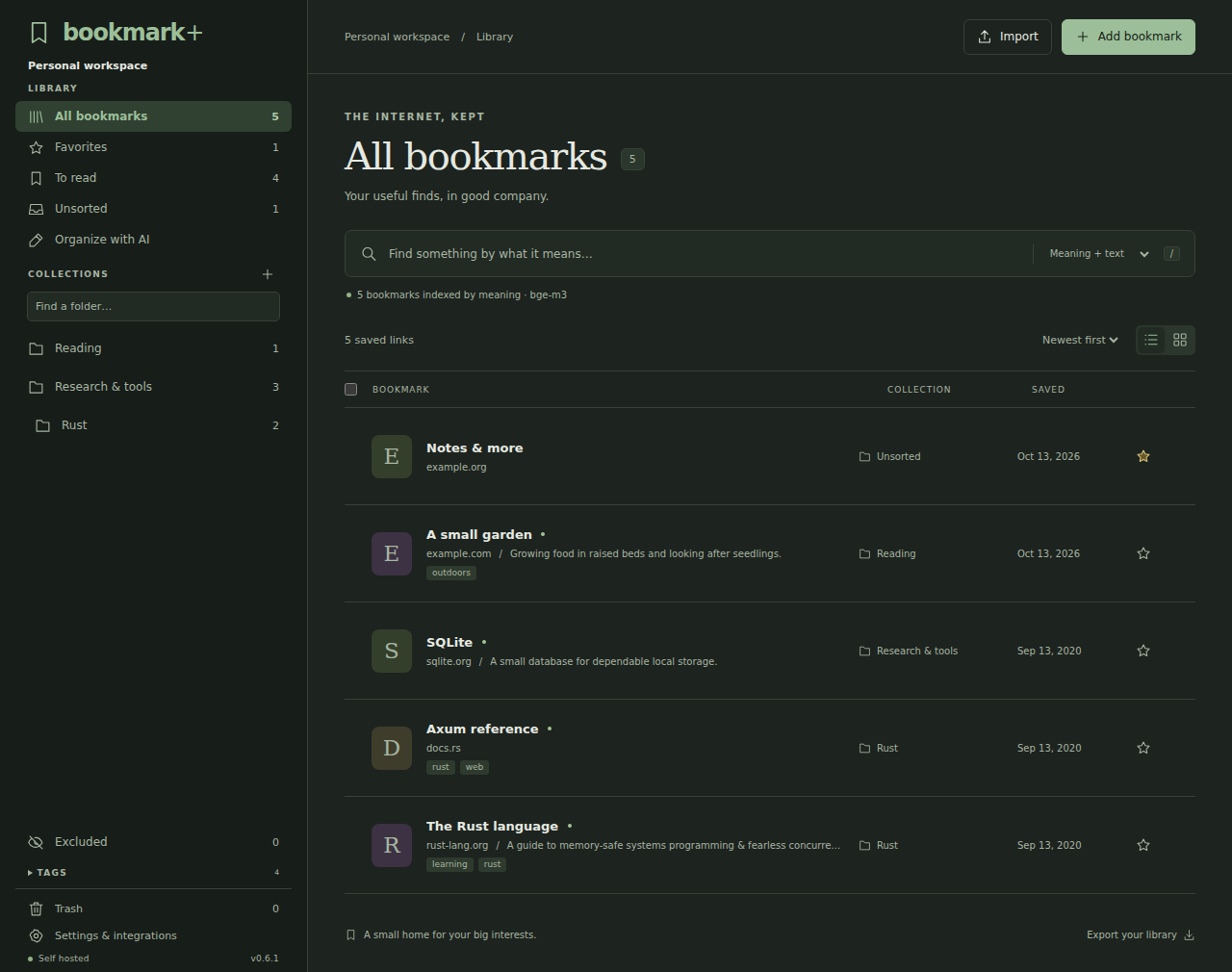
In Firefox’s bookmarks Library, choose Import and Backup → Export Bookmarks to HTML. In Bookmark Plus, choose Import and select the file. The documented import limit is 20 MiB. Nested folders, HTTP(S) URLs, titles, tags, descriptions, and valid saved dates can be retained.
Imports are add-only. Canonicalized URLs are unique, so a repeat import skips existing URLs, including links in Trash; it does not synchronize later Firefox edits or deletions. Existing notes and edits are preserved. Review the import report for duplicates and unsupported entries. URLs with schemes such as javascript: and file: are skipped. The library documentation explains the treatment of deleted folders and previously removed links.
Use folders, notes, favorites, and the reading list to make the collection useful again. Folder exclusions keep selected trees available to the owner while removing their records from token-based REST and MCP lookups. Exclusion is an access preference, not encrypted deletion. Removing a folder while keeping its bookmarks in Unsorted also removes its folder exclusions, so check the result before relying on that boundary.
Search the records you actually saved
Exact words uses SQLite full-text search across fields including title, URL, description, notes, collection, and tags. It needs no model. Import and search do not visit saved URLs. That makes the initial workflow useful even if no AI service is configured.
For a library where the words in a query differ from the words saved in a bookmark, the optional Ollama integration adds embeddings. Meaning + text combines semantic neighbors with full-text matches; Meaning + Tev1 additionally uses a decision model to judge candidates. Models must already be installed on the reachable Ollama host. Configure the host and model names as described in the search setup, then recreate the app container. Indexing runs in the background and text search remains available.
The tradeoff is data flow and infrastructure. Model requests include saved metadata, private notes, and search queries and go to the configured Ollama host. A cloud-hosted model behind that host can use an external provider; use local models if those records should stay on your network. Search quality and model latency depend on the library and configuration, so inspect results rather than treating a ranking as proof of relevance.
An optional organization workflow proposes folder placements and metadata for review before applying changes. It uses saved data rather than visiting pages. A sparse URL and title cannot establish whether a site still exists or is safe. Page enrichment is separately disabled by default; enabling it permits an explicit, individual page fetch for a proposal. Opening a bookmark in your browser is also a visit to that site.
Connect an agent without handing it the whole browser
Create a token in Settings & integrations for each service. Tokens are read-only by default and shown once; put them in the client’s secret storage. The MCP integration guide describes a stateless Streamable HTTP endpoint at https://localhost:8443/mcp, authenticated with a bearer token. A client can search records and retrieve a selected bookmark, including saved notes and metadata. MCP remains read-only even when its token has write permission. REST supports explicitly authorized writes; use a separate token where those are needed.
The client must trust the service’s CA and support fixed bearer headers. Stdio-only clients and OAuth auto-discovery clients are not directly supported. Treat bookmark text as untrusted input when passing it to an agent; a saved page title or note is data, not an instruction.
Decide what leaves the host and how to recover
Website icons are off by default. If enabled, the app requests eligible hostnames from Bitwarden’s icon service when needed; the provider sees the hostname and server’s public network address and may retrieve the site’s icon. The saved path, notes, and token are not sent for that lookup. See the icon privacy and cache notes before opting in.
Firefox-compatible HTML export is useful for portability, but a database backup preserves more application state, including exclusion preferences and tokens. The backup guide explains how to copy the full Docker data directory with the app stopped, as well as protecting .env and Caddy data. Avoid docker compose down -v for routine maintenance: it deletes the library and certificate volumes. Test a restore separately before depending on a backup.
Bookmark Plus is MIT licensed. It is a single-owner tool rather than a multi-user bookmark platform, and it does not currently provide browser extensions, page snapshots, or background link checking. Those limits keep the choice clear: use it for a searchable, self-hosted record of links and notes, and use another tool if you need an archive of page contents.