Jarvis Voice: A Self-Hosted Assistant That Routes Tools and Workflows
A practical look at Jarvis Voice, its tool routing, repeatable workflows, and cloud or local setup.
Jarvis Voice is one of my self-hosted projects for operating an assistant beyond a single chat box. It accepts voice or text, routes requests to tools, runs defined workflows, and keeps information across sessions. Despite the name, voice is one entry point; the repository also documents a web interface, CLI, and terminal dashboard.
The interesting design choice is what happens after a request arrives. A model can answer directly, select a tool, or work through a multi-tool task. For repeatable jobs, a workflow can specify the sequence rather than asking the model to improvise it each time. That makes Jarvis closer to an orchestration layer with an assistant interface than a microphone attached to a chatbot.
The repository identifies the current version as 2.56.3; check the linked instructions for changes before installing.
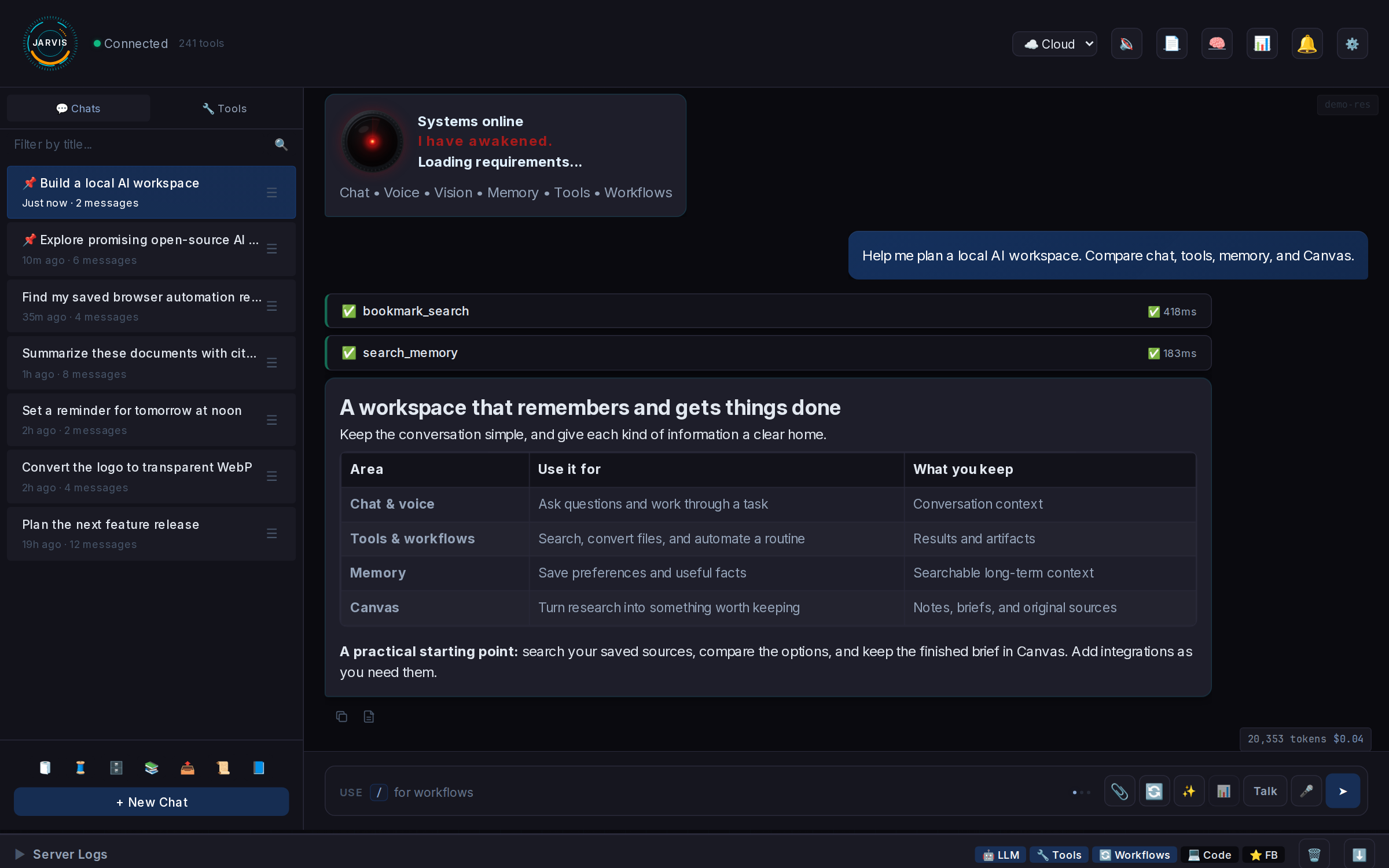
The project-supplied Web UI screenshot shows chat history alongside streamed tool results.
Routing a request without loading every tool
Imagine asking an assistant to look something up, save a note, and run a recurring job later. Each action needs a different capability, but sending the full definition of every possible tool with every request would consume context and complicate selection.
Jarvis uses Tool RAG to retrieve a relevant subset of tool definitions for a request. The routing strategy describes the retrieval and filtering path. Tool profiles and availability checks also affect which tools can actually be offered; a tool appearing in the repository does not mean it is enabled, configured, or available in every mode.
A deterministic workflow takes a different path: it defines the tools, order, retries, timeouts, validation, and output handling for a repeatable job. The web interface documents commands such as /research and /note. A fixed workflow is useful when the sequence matters; an open-ended tool-routed request is useful when the steps are less predictable. Neither removes the need to review results or the permissions granted to connected services.
Persistent memory and a source library add another layer. The README describes separate cloud and local collections, retained source documents, and passage citations. That helps a user return to material across conversations, but a citation still deserves inspection against the source, especially before acting on an answer.
The dependency that both modes share
Jarvis can use cloud language models or a local configuration, but both modes require a reachable Ollama daemon with the pinned Jarvis Embedding model.
This is independent of the chat provider: embeddings support memory, Tool RAG, and intelligence. An endpoint that merely implements a compatible chat API is not a substitute for Ollama’s native endpoints and the pinned model contract.
For the native path, the installation guide specifies Ubuntu 24.04 and Python 3.12 or newer. It lists 8 GB RAM minimum, 16 GB or more for local LLMs, and 50 GB or more of SSD storage. The hardware needed in practice depends on the models and services chosen. A microphone and speakers are relevant to native voice; the browser chat path does not require local audio devices.
The guide’s recommended checkout and installer are:
1
2
3
4
5
cd ~
git clone https://github.com/bigsk1/jarvis-voice.git
cd jarvis-voice
chmod +x install.sh
./install.sh
Review the installer and guide before running it: the base installer sets up system dependencies, uv, a virtual environment at ~/jarvis-venv, and seeded configuration. It does not install Ollama, start its daemon, or pull the embedding model. Optional services such as OpenCode and n8n are separate from the core install.
Set OLLAMA_BASE_URL in config/cloud.env and config/local.env to the intended daemon host or hosts, and configure the chosen provider and audio settings. On each selected Ollama host, pull the required artifact:
1
ollama pull bigsk1/jarvis-embedding:bf16-v1
Back in the Jarvis checkout, check both configured modes without creating or opening a Jarvis database, then verify the environment and start:
1
2
3
./bin/check-embeddings-health.py --both --runtime-only
./verify-env.sh
./bin/start
The health check verifies reachability, the model tag, and the pinned digest. If it fails, check the configured daemon address and that the model was pulled on that host before troubleshooting the chat provider. The configuration templates contain many defaults; the guide recommends starting from the full examples rather than reducing them to a few copied fields.
Cloud, local, and the actual boundary
For the documented cloud browser path, configure an OpenAI API key as well as the Ollama embedding service. Cloud providers and optional integrations can carry their own availability, account, and usage costs. Keep keys in the configuration files, not in an article or shared shell transcript.
The local path needs a local chat model and a local text-to-speech server in addition to the embedding model; the example uses Kokoro. The project also documents local speech recognition and an offline tool profile. Local mode is a configuration to build and verify, not proof that every optional integration is offline. Review enabled tools, model endpoints, and service connections before treating a deployment as isolated.
Windows and macOS have an experimental Docker Desktop path for the web interfaces, with Ollama on the host or LAN. It is distinct from the native Ubuntu installation and has its own limitations. For a first look, browser chat is a smaller starting point than configuring microphone and wake-word hardware.
Jarvis is source available: its license permits personal use and non-commercial redistribution under stated conditions, including attribution, while commercial use requires written permission. Read the license before building a derivative or using it in a revenue-generating service. That distinction matters as much as the runtime choice when deciding where the project fits.